Quitting an Intel x86 hypervisor
This is an esoteric topic that might be of interest to people implementing Intel hypervisors. It assumes you know the basics of the Intel virtualization architecture, see Hypervisor from scratch for a tutorial. The actual full VT architecture is described in Volume 3 of the Intel SDM
Let’s say we write an x86 hypervisor that starts in the UEFI environment and virtualizes the initialization phase of an OS. But the hypervisor wants to eventually quit itself to not cause extra overhead during OS run time.
The way the hypervisor works is that it runs in its own memory and with its own page tables which are switched atomically on every VM exit by the VT-x implementation. This way it is isolated from the main OS.
At some vm exit with the hypervisor running in its own context it decides that it is not needed anymore and wants to quit. To disable VT support the VMXOFF instruction can be used. But what we really need is an atomic VMXOFF + switch to the original OS page tables plus a jump, and all that without using any registers which need to be already restored to the original state of the OS.
One trick is to use the MOV to CR3 instruction that reloads the page table as a jump. As soon as the page table is reloaded the CPU will fetch the next instruction with the translations from the freshly loaded page table, so we can transfer execution to the guest context. However to do that the MOV CR3 needs to be located just before the page offset of the target instruction. This can be done by copying a trampoline to the right page offset (potentially overlapping into the previous page). The trampoline is located in a special transfer page table mapping that places writable code pages overlapping the target mapping.
But there are some complications. The hypervisor also needs to load the segmentation state (like GDT/LDT/IDT) of the guest. In theory they could just be loaded by mapping these guest pages into the transfer mapping and loading them before the transfer. But what happens if the GDT/LDT/IDT is on the same page as the target address? This is common in real OS’ assembler startup code which is implemented in a small assembler file without any page separation between code and data. One option would be to copy them to the transfer page too and load it there, or the hypervisor first copies them to a temporary buffer and loads it from there. In the second option the base addresses of these structures will be incorrect, but in practice you can often rely on them getting reloaded eventually anyways.
Another problem is the register state of the target. MOV to CR3 needs a register as the source of the reload, and it needs to be the last instruction of the trampoline. So it is impossible to restore the register it uses. But remember the hypervisor is doing this as the result of a VM exit. If we chose an exit for a condition that already clobbers a register we can use the same register for the reload and the next instruction executed in the original target (and which caused the exit originally) will just overwrite it again.
A very convenient instruction for this is CPUID. It is executed multiple times in OS startup and overwrites multiple registers. In fact VMX always intercepts CPUID so it has to handle these exits in any case. So the trick to quit an hypervisor is to wait for the next CPUID exit and then use one of the registers clobbered by CPUID for the final CR3 reload. This will have inconsistent register state for one instruction in the target, but unless the original OS is currently running a debugger it will never notice. In principle any exit as a result of an instruction that clobbers a register can be used for this.
There is another potential complication if the target address of the OS conflicts with where the hypervisor is running before entering the transfer mapping. The transfer mapping needs to map the original code so that it can be jumped to. This could be solved with a third auxiliary mapping that is used before jumping to the transfer trampoline. In practice it doesn’t seem to be a problem because x86 OS typically run in a 1:1 mapping for startup, and that cannot conflict with the 1:1 mapping used by UEFI programs as our hypervisor.
Happy hypervisor hacking!
The browser circle closes again
For a long time I was using Firefox (together with lynx), until a couple years ago it became unusably buggy: it would become very slow when lots of tabs were open, and worse often corrupt its recovery database, so when you restarted it most of my tabs were gone.
At that point I switched to Chrome. It wasn’t really faster, but at least didn’t slow down. But recently the bugginess on Chrome is increasing to intolerable levels too. For example my whole Chrome regularly hangs with all the windows locking up. I figured out that if you kill the “gpu” process of chrome it continues — it seems to be stuck on some futex. That wouldn’t be too bad, but I noticed that also plugins that I use break regularly.
Time to switch back to Firefox? Wish there were more credible alternatives.
A primer on Processor Trace timing
Processor Trace can be quite useful to understand the timing break down of programs. This post describes how the timing works and how to get the best timing resolution.
Processor Trace logs are packetized. A trace uses three kinds of timing packets: PSB TSC updates, MTC and CYC. PSB is the basic synchronization of the trace and provides a full TSC time stamp. However it is quite coarse grained. The MTC packet provides regular timing updates from the 24/25Mhz ART Always Running Timer. And then finally there is an optional cycle accurate mode that gives cycle accurate updates relative to the last MTC packet.
Note that Broadwell Processor Trace used a different much less accurate method only using the PSB timing updates. For accurate timing please use Skylake or later or Goldmont Atom or later..
By default Linux perf uses a mtc period of 3, which means there is an ART timing update ever 2^3=8 times, so roughly every 300ns. That is quite coarse grained, usually not fine grained enough for a program time break down. It is possible to increase the timing resolution at some trace overhead cost, longer decoding time, and a risk of additional data loss.
We can set the MTC period to 0 to get more frequent MTC updates. In addition by default perf script only reports us, so we should use the –ns option to force nano second timestamp output:
perf record -e intel_pt/mtc_period=0/ -a ...

perf script --ns --insn-trace --xed
Now in addition to that we can enable cycle accurate mode to get better resolution (at the cost of a significantly larger trace):
perf record -e intel_pt/mtc_period=0,cyc/ -a ...

perf script --ns --insn-trace --xed
When the resulting trace is too big it’s also possible to use the cyc_thresh=N option, which configured cycle packets only every 2^N cycles. This can be useful if the full accurate trace causes too much data loss.
When looking at the output we still only get updates roughly every 5 conditional branches or returns. This is related to how PT encodes the branches into packets. Cycle updates are only written to the trace when the CPU writes a packet for a branch, or another reason. Conditional branches and returns are encoded into TNT packets, and a TNT packet is always filled with 5 conditionals or returns before it is being written.
For returns we can disable the ‘return compression’ which leads to a guaranteed packet at every return, so at least we get a time stamp at the end of every function. Again this comes at significant additional trace overhead.
perf record -e intel_pt/noretcomp,cyc,mtc_period=0/ ...

perf script --ns --insn-trace --xed
With this we can see timing updates every 5 conditional branches or return. But often we want to time complete functions. Unfortunately function calls are direct, which are not logged by PT because it can be statically determined by the PT decoder. One track is to call the function through an indirect pointer, which results in a TIP packet, and therefore a timing update at the beginning of the function. However that requires modifying the code.
There is another trick that we can use to time individual functions. PT has address filters to enable/disable the trace. We can enable PT at the beginning of the function and disable it at the end. Disable/Enable has accurate time stamps, so that’s good enough to time the function:
perf record -e intel_pt/cyc,mtc_period=0,noretcomp/ --filter 'myfunc @ /path/to/executable' executable

perf script --ns --insn-trace --xed
The CPU supports upto two address filter region, so this trick works for two function at a time. We could time more by switching the filter regions over time. It can be used to time smaller program regions too, however it is required that they be entered and exited by a branch.
[Based on an earlier writeup from Adrian Hunter]
Cheat sheet for Intel Processor Trace with Linux perf and gdb
What is Processor Trace
Intel Processor Trace (PT) traces program execution (every branch) with low overhead.
This is a cheat sheet of how to use PT with perf for common tasks
It is not a full introduction to PT. Please read Adding PT to Linux perf or the links from the general PT reference page.
PT support in hardware
| CPU | Support |
| Broadwell (5th generation Core, Xeon v4) | More overhead. No fine grained timing. |
| Skylake (6th generation Core, Xeon v5) | Fine grained timing. Address filtering. |
| Goldmont (Apollo Lake, Denverton) | Fine grained timing. Address filtering. |
PT support in Linux
PT is supported in Linux perf, which is integrated in the Linux kernel.
It can be used through the “perf” command or through gdb.
There are also other tools that support PT: VTune, simple-pt, gdb, JTAG debuggers.
In general it is best to use the newest kernel and the newest Linux perf tools. If that is not possible older tools and kernels can be used. Newer tools can be used on an older kernel, but may not support all features
| Linux version | Support |
| Linux 4.1 | Initial PT driver |
| Linux 4.2 | Support for Skylake and Goldmont |
| Linux 4.3 | Initial user tools support in Linux perf |
| Linux 4.5 | Support for JIT decoding using agent |
| Linux 4.6 | Bug fixes. Support address filtering. |
| Linux 4.8 | Bug fixes. |
| Linux 4.10 | Bug fixes. Support for PTWRITE and power tracing |
Many commands require recent perf tools, you may need to update them rom a recent kernel tree.
This article covers mainly Linux perf and briefly gdb.
Preparations
Only needed once.
Allow seeing kernel symbols (as root)
echo kernel.kptr_restrict=0' >> /etc/sysctl.conf

sysctl -p
Basic perf command lines for recording PT
ls /sys/devices/intel_pt/format
Check if PT is supported and what capabilities.
perf record -e intel_pt// program
Trace program
perf record -e intel_pt// -a sleep 1
Trace whole system for 1 second
perf record -C 0 -e intel_pt// -a sleep 1
Trace CPU 0 for 1 second
perf record --pid $(pidof program) -e intel_pt//
Trace already running program.
perf has to save the data to disk. The CPU can execute branches much faster than than the disk can keep up, so there will be some data loss for code that executes
many instructions. perf has no way to slow down the CPU, so when trace bandwidth > disk bandwidth there will be gaps in the trace. Because of this it is usually not a good idea
to try to save a long trace, but work with shorter traces. Long traces also take a lot of time to decode.
When decoding kernel data the decoder usually has to run as root.
An alternative is to use the perf-with-kcore.sh script included with perf
perf script --ns --itrace=cr
Record program execution and display function call graph.
perf script by defaults “samples” the data (only dumps a sample every 100us).
This can be configured using the –itrace option (see reference below)
Install xed first.
perf script --itrace=i0ns --ns -F time,pid,comm,sym,symoff,insn,ip | xed -F insn: -S /proc/kallsyms -64
Show every assembly instruction executed with disassembler.
For this it is also useful to get more accurate time stamps (see below)
perf script --itrace=i0ns --ns -F time,sym,srcline,ip
Show source lines executed (requires debug information)
perf script --itrace=s1Mi0ns ....
Often initialization code is not interesting. Skip initial 1M instructions while decoding:
perf script --time 1.000,2.000 ...
Slice trace into different time regions Generally the time stamps need to be looked up first in the trace, as they are absolute.
perf report --itrace=g32l64i100us --branch-history
Print hot paths every 100us as call graph histograms
Install Flame graph tools first.
perf script --itrace=i100usg | stackcollapse-perf.pl > workload.folded

flamegraph.pl workloaded.folded > workload.svg

google-chrome workload.svg
Generate flame graph from execution, sampled every 100us
Other ways to record data
perf record -a -e intel_pt// sleep 1
Capture whole system for 1 second
Use snapshot mode
This collects data, but does not continuously save it all to disk. When an event of interest happens a data dump of the current buffer can be triggered by sending a SIGUSR2 signal to the perf process.
perf record -a -e --snapshot intel_pt// sleep 1

PERF_PID=$!

*execute workload*
*event happens*

kill -USR2 $PERF_PID
*end of recording*

kill $PERF_PID>
Record kernel only, complete system
perf record -a -e intel_pt//k sleep 1
Record user space only, complete system
perf record -a -e intel_pt//u
Enable fine grained timing (needs Skylake/Goldmont, adds more overhead)
perf record -a -e intel_pt/cyc=1,cyc_thresh=2/ ...
echo  $[100*1024*1024] > /proc/sys/kernel/perf_event_mlock_kb

perf record -m 512,100000 -e intel_pt// ...
Increase perf buffer to limit data loss
perf record -e intel_pt// --filter 'filter main @ /path/to/program' ...
Only record main function in program
perf record -e intel_pt// -a --filter 'filter sys_write' program
Filter kernel code (needs 4.11+ kernel)
perf record -e intel_pt// -a --filter 'stop func2 @ program' program
Stop tracing at func2.
perf archive

rsync -r ~/.debug perf.data other-system:
Transfer data to a trace on another system. May also require using perf-with-kcore.sh if decoding
kernel.
Using gdb
Requires a new enough gdb built with libipt. For user space only.
gdb program

start

record btrace pt # cannot be done before start. has to be redone every re-start

cont
record instruction-history /m	# show instructions

record function-call-history		# show functions executed

reverse-step   # step backwards in time
For more information on gdb pt see the gdb documentation
References
Reference for –itrace option (from perf documentation)
i       synthesize "instructions" events

b       synthesize "branches" events

x       synthesize "transactions" events

c       synthesize branches events (calls only)

r       synthesize branches events (returns only)

e       synthesize tracing error events

d       create a debug log

g       synthesize a call chain (use with i or x)

l       synthesize last branch entries (use with i or x)

s       skip initial number of events
Reference for –filter option (from perf documentation)
 A hardware trace PMU advertises its ability to accept a number of

address filters by specifying a non-zero value in

/sys/bus/event_source/devices/ /nr_addr_filters.
Address filters have the format:
filter|start|stop|tracestop [/ ] [@]
Where:
– ‘filter’: defines a region that will be traced.
– ‘start’: defines an address at which tracing will begin.
– ‘stop’: defines an address at which tracing will stop.
– ‘tracestop’: defines a region in which tracing will stop.
is the name of the object file, is the offset to the
code to trace in that file, and is the size of the region to
trace. ‘start’ and ‘stop’ filters need not specify a .
If no object file is specified then the kernel is assumed, in which case
the start address must be a current kernel memory address.
can also be specified by providing the name of a symbol. If the
symbol name is not unique, it can be disambiguated by inserting #n where
‘n’ selects the n’th symbol in address order. Alternately #0, #g or #G
select only a global symbol. can also be specified by providing
the name of a symbol, in which case the size is calculated to the end
of that symbol. For ‘filter’ and ‘tracestop’ filters, if is
omitted and is a symbol, then the size is calculated to the end
of that symbol.
If is omitted and is ‘*’, then the start and size will
be calculated from the first and last symbols, i.e. to trace the whole
file.
If symbol names (or ‘*’) are provided, they must be surrounded by white
space.
The filter passed to the kernel is not necessarily the same as entered.
To see the filter that is passed, use the -v option.
The kernel may not be able to configure a trace region if it is not
within a single mapping. MMAP events (or /proc/ /maps) can be
examined to determine if that is a possibility.
Multiple filters can be separated with space or comma.
v2: Fix some typos/broken links
v3: Update gdb commands
Intel Processor Trace resources
Intel Processor Trace (PT) can be used on modern Intel CPUs to trace execution. This page contains references for learning about and using Intel PT.
Basic information:
- Intel Software Developer’s Manual Vol 3 low level reference information on Processor Trace trace format and registers (Chapter 36)
- Intel Processor Trace on Linux gives an overview of processor trace on Linux
- A tutorial web site for PT that contains many references
- Intel® Developer Forum 2015: Zoom-in on Your Code with Intel® Processor Trace and Supporting Tools (find SPCS012)
- Intel® Developer Forum 2014: Debug and Fine-grain Profiling with Intel® Processor Trace
- Efficient and large scale program flow tracing in Linux
Implementations
- Adding processor trace to Linux describes the Linux perf Processor trace implementation.
- Reference documentation for PT on Linux perf
- simple-pt is an alternative reference PT implementation. It is implemented on Linux, but can be also used as a starting point to implement PT on other OS.
- The GNU debugger gdb support PT on Linux for backward debugging
- Intel VTune amplifier supports PT for performance analysis
- A Windows windbg processor trace plugin for debugging on Windows with PT.
- A reference Processor Trace decode library.
- A plugin for Linux crash to dump PT buffers (look for ptdump)
JTAG support
- The Lauterbach JTAG debugger supports PT
- Intel system studio supports JTAG debugging with PT
- The SourcePoint for Intel debugger support PT
Other presentations
Usages
- The hongfuzz fuzzer supports feedback fuzzing using PT
- Harnessing Intel Processor Trace on Windows for vulnerability discovery
Research papers using PT (subset):
- Failure Sketching: A technique for automated root cause analysis of in production failures
- Griffin: Guarding control flows using Intel Processor Trace
- Hardware-assisted instruction profiling and latency detection
- Inspector: Data Provenance using Intel Processor Trace
- Transparent and efficient CFI enforcement with Intel Processor Trace
Literature survey for practical TSX lock elision applications
Introduction
This is a short non comprehensive (and somewhat biased) literature survey on how lock elision with Intel TSX can be used to improve performance to programs by increasing parallelism. Focus is on practical incremental improvements in existing software.
A basic introduction of TSX lock elision is available in Scaling existing lock based applications with Lock elision.
Lock libraries
The papers below are on actual code using lock elision, not just how to implement lock elision itself. The basic rules of how to implement lock elision in a locking library are in chapter 12 of the Intel Optimization manual. Common anti-patterns (mistakes) while doing so are described in TSX Anti-patterns.
Existing lock libraries that implement lock elision using TSX include glibc pthreads, Thread Building Blocks, tsx-tools and ConcurrencyKit
Databases
Lock elision has been used widely to speed up both production and research databases. A lot of work has been done on the SAP HANA in memory data which uses TSX in production today to improve performance of the B+Tree index and the delta tree data structures. This is described in Improving In-Memory Database Index Performance with TSX.
Several research databases went beyond just using TSX to speed up specific data structures, but map complete database transactions to hardware transaction. This requires much more changes to the databases, and careful memory layout, but can also give more gains. It generally goes beyond simple lock elision. This approach has been implemented by Leis in Exploiting HTM in Main memory databases. A similar approach is used in Using Restricted Transactional Memory to Build a Scalable In-Memory Database. Both see large gains on TPC-C style workloads.
For non in memory databases, a group at Berkeley used lock elision to improve parallelism in LevelDB and getting a 25% speedup on a 4 core system. Standard LevelDB is essentially a single lock system, so this was a nice speedup with only minor work compared to other efforts that used manual fine grained locking to improve parallelism in LevelDB. However it required special handling of condition variables, which are used for commit. For simpler key value stores Diegues used an automatic tuner with TSX transactions to get a 2x gain with memcached.
DrTM uses TSX together with RDMA to implement a fast distributed transaction manager using 2PL. TSX provides local isolation, while RDMA (which aborts transactions) provides remote isolation.
Languages
An attractive use of lock elision is to speed up locks implicit in language runtimes. Yoo implemented transparent. support for using TSX for Java synchronized sections in Early Experience on Transactional
Execution of Java TM Programs. The runtime automatically detects when a synchronized region does not benefit from TSX and disables lock elision then. This works transparently, but using it successfully may still need some changes in the program to minimize conflicts and other aborts, as described by Gil Tene in Understanding Hardware Transactional Memory. This support is available in JDK 8u40 and can be enabled with the -XX:+UseRTMLocking option.
Another interesting case for lock elision is improving parallelism for the Great Interpreter Lock (GIL) used in interpreters. Odaiara implemented this for Ruby in Eliminating Global Interpreter Locks in Ruby through HTM. They saw a 4.4x speedup on Ruby NPB, 1.6x in WEBrick and 1.2x speedup in Ruby on Rails on a 12 core system.
Hardware transactions can be used for auto-parallelizing existing loops, even when the compiler cannot prove that iterations are independent, by using the transactions to isolate individual iterations. Odaira implemented TSX loop speculation manually for workloads in SPECCpu and report a 11% speedup on a 4 core system. There are some limitations to this technique due to the lazy subscription problem described by Dice, but in principle it can be directly implemented in compilers.
Salamanca used TSX to implement tracing recovery code for Speculative Trace Optimization (STO) for loops. The basic principles are similar to the previous paper, but they implemented an automated prototype. They report 9% improvement on 4 cores with a number of benchmarks.
An older paper, which predates TSX, by Dice describes how to use Hardware Transactional Memory to simplify Work Stealing schedulers.
High Performance Computing
Yoo.et.al. use TSX lock elision to benchmark a number of HPC applications in Performance Evaluation of Intel TSX for High-Performance Computing. They report an average 41% speedup on a 4 core system. They also report an average 31% improvement in bandwidth when applying TSX to a user space TCP stack.
Hay explored lock elision for improving Parallel Discrete Event Simulations. He reports a speed ups of up to 28%.
Data structures
Lock elision has been used widely to speed up parallel data structures. Normally applying lock elision to an existing data structure is very simple — elide the lock protecting it — but some tweaking of the data structure can often give better performance. Dementiev explores TSX for general fast scalable hash tables. Li uses TSX to implement scalable Cuckoo hash tables. Using TSX for hash tables is generally very straight forward. For tree data structures one need to be careful that tree rebalancing does not overwhelm the write set capacity of the hardware transactions., Repetti uses TSX to scale Patricia Tries. Siakavas explores TSX usage for scalable Red-Black Trees, similar in this paper. Bonnichsen uses HTM to improve BT Trees, reporting a speed up of 2x to 3x compared to earlier implementations. The database papers described above describe the rules needed to successfully elide BTrees.
Calciu uses TSX to implement a more scalable priority queue based on skip list and reports increased parallelism.
Memory allocation and Garbage Collection
One challenge with using garbage collection is that the worst case “stop the world” pauses from parallel garbage collectors limit the total heap size that can be supported in copying garbage collectors. The Chihuahua GC paper implements a prototype TSX based collector for the Jikes research java VM. They report upto 101% speedup in concurrent copying speed, and show that a simple parallel garbage collector can be implemented with limited efforts.
Another dog-themed GC, the Collie garbage collector (original paper predates TSX) presents a production quality parallel collector that minimizes pauses and allows scaling to large heaps. Opdahl has another description of the Collie algorithm It is presumably deployed now for TSX in Azul’s commercial ZING JVM product which claims to scale upto 2TB of heap memory.
StackTrack is an efficient algorithm to do automatic memory reclaim for parallel data structures using hardware transactions, out performing existing techniques such as hazard pointers. It requires recompiling the program with a special patched gcc compiler, and automatically creates variable-length transactions for functions freeing memory. The technique could be potentially used even without special compilers.
Kuzmaul uses TSX to implement a scalable SuperMalloc and reports good performance combined with relatively simple code. Dice et all report how an cache index aware malloc can improve TSX performance by improving utilization of the L1 cache.
Other usages
Peters use lock elision to parallelize a micro kernel For a micro kernel a big lock is fine and finds that RTM lock elision outperforms fine grained locking due to less single thread overhead.
Overview of Last Branch Records (LBRs) on Intel CPUs
I wrote a two part article on theory and practice of Last Branch
Records using Linux perf. They were published on LWN.
This includes the background (what is a last branch record and why
branch sampling), what you can use it for in perf, like hot path
profiling, frame pointerless callgraphs, or automatic micro benchmarks,
and also other uses like continuous compiler feedback.
The articles are now freely available:
Part 1: Introduction of Last Branch Records
Part 2: Advanced uses of Last Branch Records
Announcing simple-pt — A simple Processor Trace implementation
Modern Intel Core CPUs (5th and 6th generation) have a Intel Processor Trace (PT) feature to trace branch execution with low overhead. This is useful for performance analysis and debugging.
simple-pt is a simple standalone driver and decoder tool to implement PT on Linux.
Starting with Linux 4.1 Linux already has a integrated PT implementation in perf (see https://lwn.net/Articles/648154/ ). simple-pt is an alternative implementation. It has many disadvantages over the perf PT implementation, such as:
– needs to run as root
– no long term tracing or sampling with interrupts
– no support for interactive debugging (use gdb 7.10 on perf for that)
– no support for histograms
– somewhat experimental
– not as well supported as perf
On the positive side simple-pt is:
– simple
– standalone. No kernel changes needed. Could be ported to older kernels or other operating systems
– easy to modify and experiment with
– more ftrace like decoding tool
– support for kprobes based triggers
– modular “unix style” design with simple tools that do only one thing each
– BSD licensed
Example output:
        % sptcmd  -c tcall taskset -c 0 ./tcall
        cpu   0 offset 1027688,  1003 KB, writing to ptout.0
        ...
        Wrote sideband to ptout.sideband
        % sptdecode --sideband ptout.sideband --pt ptout.0 | less
        TIME      DELTA  INSNs   OPERATION
        frequency 32
        0        [+0]     [+   1] _dl_aux_init+436
                          [+   6] __libc_start_main+455 -> _dl_discover_osversion
        ...
                          [+  13] __libc_start_main+446 -> main
                          [+   9]     main+22 -> f1
                          [+   4]             f1+9 -> f2
                          [+   2]             f1+19 -> f2
                          [+   5]     main+22 -> f1
                          [+   4]             f1+9 -> f2
                          [+   2]             f1+19 -> f2
                          [+   5]     main+22 -> f1
        ...
Available from https://github.com/andikleen/simple-pt
Generating Flame graphs with Processor Trace
How to generate a FlameGraph with Processor Trace. Everybody loves Flame Graphs.

Processor trace allows to do as very exact histograms of a program’s run time. Normal sampling has shadow effects, which can hide some details. Processor traces every branch, so it can be much more accurate than normal sampling.
You need a Intel Broadwell or Skylake CPU.
Running at 4.1 or later Linux kernel where perf supports PT.
You can verify the kernel supports pt with
ls /sys/devices/intel_pt
You need perf user tools built from https://github.com/virtuoso/linux-perf
(this should soon be fixed when the user tools code is merged into Linux mainline)
Build perf with PT support
# set up https_proxy as needed

git clone https://github.com/virtuoso/linux-perf

cd linux-perf/tools/perf

make
Copy the resulting perf binary to where you want to run it
Get the flamegraph code
git clone https://github.com/brendangregg/FlameGraph.git
.
Collect data from the workload. Best to not collect too long traces as they take much longer to process and may need too much disk space.
perf record -e intel_pt// workload (or -a sleep 1 to collect 1s globally)
Decode the data. This may take quite some time
perf script --itrace=i100usg | /path/to/FlameGraph/ | stackcollapse-perf.pl > workload.folded
The i100us means the trace decoder samples an instruction every 100us. This can be made more accurate (down to 1ns), at the cost of longer decoding time. The ‘g’ tells the decoder to add callgraphs.
Then generate the Flamegraph with
/path/to/FlameGraph/flamegraph.pl workloaded.folded > workload.svg
Then view the resulting SVG in a SVG viewer, such as google chrome
google-chrome workload.svg
It is possible to click around.
Here’s a larger svg example from a gcc build (2.5MB). May need chrome or firefox to view.
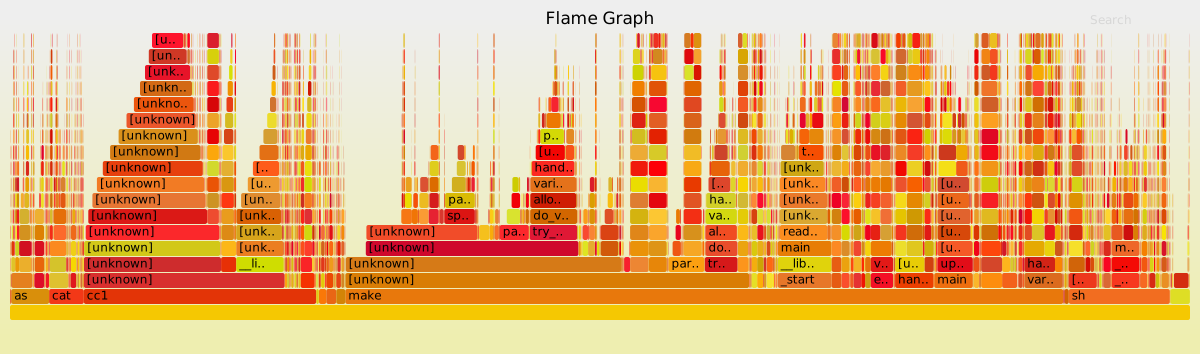
In principle the trace also has support for more information not in normal sampling, such as determining the exact run time of individual functions from the trace. This is unfortunately not (yet?) supported by the Flame Graph tools.
Energy efficient servers book review
Energy efficient servers – Blue prints for data center optimization from Gough/Steiner/Sanders is a new book on power tuning on servers that was recently published at Apress. I got my copy a few weeks ago and read it and it is great.
Disclaimer: I contributed a few pages to the book, but have no financial interest in its success.
As you probably already know power efficiency is very important for modern computing. It matters to mobile devices to extend battery time, it matters to desktops and servers to avoid exceeding the thermal/power capacity and lower energy costs.
Modern chips cannot run all their transistors at full speed at the same time due to the dark silicon problem. This results in the somewhat paradoxical situation that power management is needed, even if energy costs don’t matter, just to give the best performance (such as the highest Turbo frequencies)
Power management in modern systems is quite complex, with many different moving parts, hardware, operating systems, drivers, firmware, embedded micro-controllers working together to be as efficient as possible. I’m not aware of any good overview of all of this.
There is some lore around — for example you may have heard of race to idle, that is running as fast as possible to go idle again — but nothing really that puts it all into a larger context. BTW race-to-idle is not always a good idea, as the book explains.
The new book makes an attempt to explain all of this together for Intel servers (the basic concepts are similar on other systems and also on client systems).
It starts with a (short) introduction of the underlying physical principles and then moves on to the basic CPU and platform power management techniques, such as frequency scaling and idle state and thermal management. It has a discussion on modern memory subsystems and describes the trade offs between different DIMM configurations. It describes the power management differences between larger servers and micro servers. And there is a overview of thermal management and power supply, such as energy efficient power supplies and voltage regulators.
Then it moves on to an overview of the software involved in power management, including firmware, rack level power management software, and operating systems. Then there is an extensive chapter how to instrument and measure power management
Finally (and perhaps most valuable) the book lays out a systematic power tuning methodology, starting with measurements and then concrete steps to optimize existing workloads for the best power efficiency.
The book is written not as an academic text book, but intended for people who solve concrete problems on shipping systems. It is quite readable, explaining any complicated concepts. You can clearly tell the authors have deep knowledge on the topic. While the details are intended for Intel servers, I would expect the book to be useful even to people working on clients or also other architectures.
One possible issue with the book is that it may be too specific for today’s systems. We’ll see how well it ages to future systems. But right now, as it just came out, it it very up-to-date and a good guide. It has some descriptions of data center design (such as efficient cooling), but these parts are quite short and are clearly not the main focus.
The ebook version is currently available as a free download both at the the publisher after registration, or at amazon as free kindle edition, or as reasonable priced paperback.